








EEO#.MODE
Description
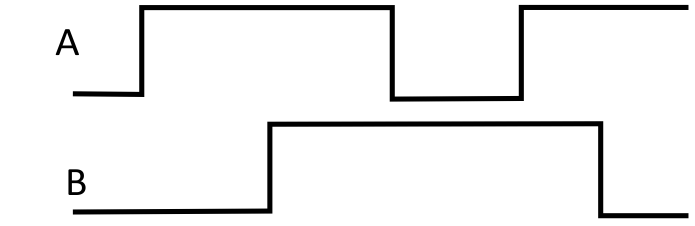
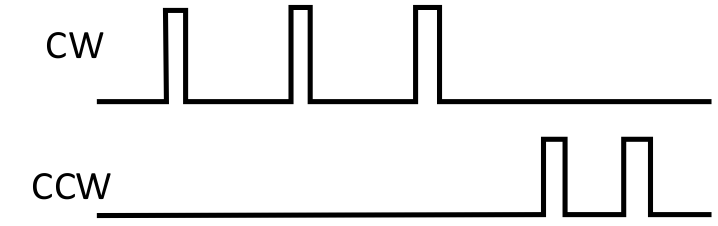
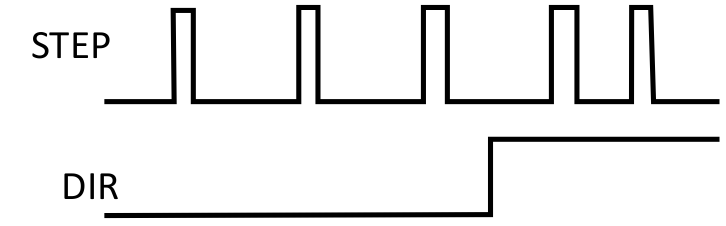
This keyword specifies the type of output waveform an EEO generator will create.
| SOURCE | ||
|---|---|---|
| 0 (default) | A Quad B |
|
| 1 | CW/CCW |
|
| 2 | Step/Direction |
|
Examples
Code
This will set the 2nd EEO output mode to Clockwise/Counter-clockwise.
-->EEO2.MODE 1
Context
For more information see Output - Encoder Emulation.
Versions
| Action | Version | Notes |
|---|---|---|
| Implemented | 02-00-00-000 |
General Information
| Type | Read/Write |
| Units | N/A |
| Range | 0 to 2 |
| Default Value | 0 |
| Data Type | Integer |
| See Also | |
| Stored in Non-Volatile Memory | Yes |
Variants Supported
All variants are supported.
Industrial Ethernet Information
|
Command |
Index |
SubIndex |
Data Type |
Units |
Float Scale |
Access |
PDO Mappable |
|---|---|---|---|---|---|---|---|
|
EEO1.MODE |
4600h |
03h |
Unsigned8 |
- |
- |
Read/Write |
No |
|
EEO2.MODE |
4601h |
03h |
Unsigned8 |
- |
- |
Read/Write |
No |
|
EEO3.MODE |
4603h |
03h |
Unsigned8 |
- |
- |
Read/Write |
No |
|
EEO4.MODE |
4606h |
03h |
Unsigned8 |
- |
- |
Read/Write |
No |
|
ID |
Instance |
Attribute |
Name |
Data Type |
Access |
User Mappable |
|---|---|---|---|---|---|---|
|
32010 |
1 |
32010 (0x7d0a) |
EEO1.MODE |
Unsigned8 |
Read/Write |
Yes |
|
32011 |
1 |
32011 (0x7d0b) |
EEO2.MODE |
Unsigned8 |
Read/Write |
Yes |
|
32012 |
1 |
32012 (0x7d0c) |
EEO3.MODE |
Unsigned8 |
Read/Write |
Yes |
|
32013 |
1 |
32013 (0x7d0d) |
EEO4.MODE |
Unsigned8 |
Read/Write |
Yes |
|
Parameter |
PNU |
Data Type |
Access |
Units |
|---|---|---|---|---|
|
EEO1.MODE |
32010 |
Unsigned8 |
Read/Write |
- |
|
EEO2.MODE |
32011 |
Unsigned8 |
Read/Write |
- |
|
EEO3.MODE |
32012 |
Unsigned8 |
Read/Write |
- |
|
EEO4.MODE |
32013 |
Unsigned8 |
Read/Write |
- |


